
How I explored a structured AI workflow that turns simple prompts and screenshots into consistent, handoff-ready interface concepts.
The Problem: AI is Fast, But Not Reliable
AI tools can generate interface ideas in seconds. A simple prompt or screenshot can produce a layout, a form, a dashboard, a workflow, or even a full product screen.
But speed is not the real problem: it is consistency.
Early outputs often looked impressive at first glance, but they introduced inconsistencies: spacing drifted, visual hierarchy varied, component behaviour changed, and patterns were recreated instead of reused. In a real product environment, those differences matter. They create design debt, slow down review, and make it harder for teams to trust AI-generated work.
AI output is currently most useful for quickly exploring high-level concepts or generating workflows even after providing actual product screenshot and detailed prompts.
I wanted to explore a different question:
What would it take for AI to generate a UI that feels like it belongs to the same product system every time?
Why Prompting Alone Was Not Enough
At first, the obvious answer seemed to be better prompting: more detailed instructions, more examples, and more corrections.
But I quickly realised that prompts alone were fragile.
Even connecting AI to a Figma design system through MCP was not enough on its own. Access to components, tokens, or design files does not automatically create good design judgement. The AI still needs to understand when to reuse a pattern, how to apply it in context, which decisions need human confirmation, and how to avoid creating one-off interface choices.
A prompt can describe an outcome, but it does not carry the full memory of a product interface. It does not automatically know which patterns are approved, when to reuse a component, which decisions require human confirmation, or how to avoid introducing one-off styles.
That became the turning point.
Instead of treating AI as a creative tool that needed better instructions, I started treating it as a junior designer that needed structure, boundaries, and review criteria.
The Goal: Designing a Governed AI Workflow
The goal was not to automate design judgement.
The goal was to reduce repetitive production effort while keeping design quality intact.
I wanted a workflow where a designer, product manager, or founder could start with a rough prompt, screenshot, or product idea and get a UI direction that was more consistent with the design system and can be used for production-ready handoffs.
For this to work, the AI needed more than a prompt. It needed structured design guidance, reusable standards, clear quality gates, and a separation between generation and review.
The ambition was simple:
Make AI faster without making the product less consistent.
The System Behind Consistent AI UI
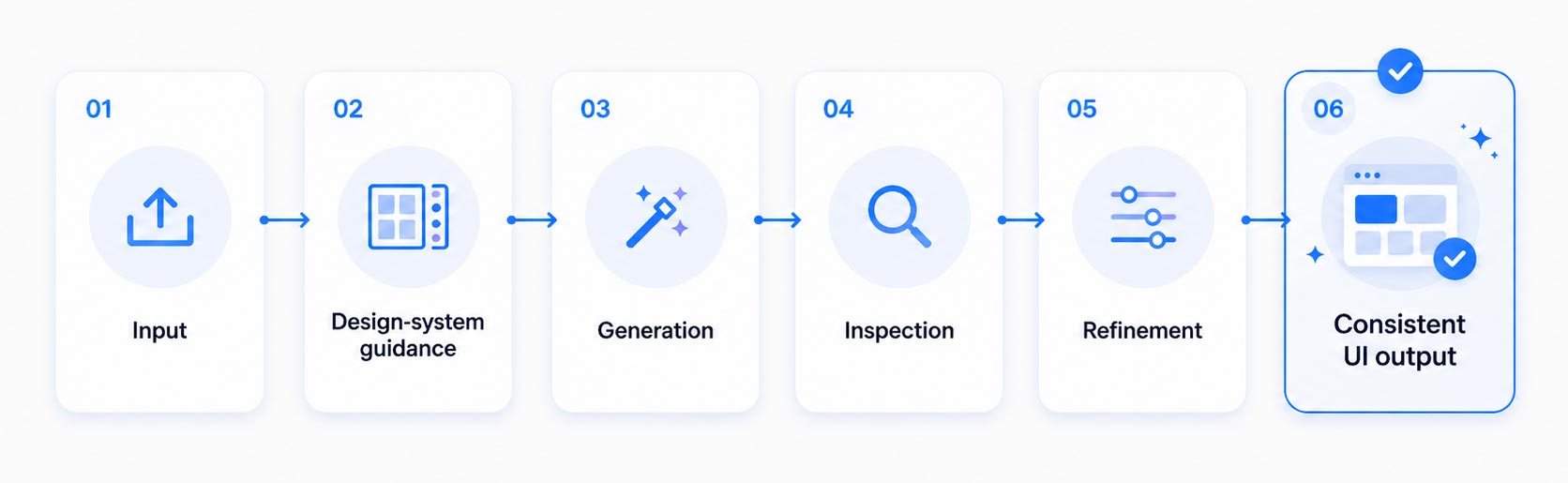
To make this work, I designed a workflow that connects design tokens, components, layout structure, and execution rules into a single governed system. The Figma design system became the foundation, while markdown-based guidance translated those design decisions into rules the AI could follow.
This gave the AI clearer constraints for generating UI concepts, reducing inconsistent outputs and limiting unsupported design decisions.
The Approach: Separating Generation From Review
Asking AI to both create and evaluate its own output was unreliable. The same system that generated a screen could easily overlook its own inconsistencies.
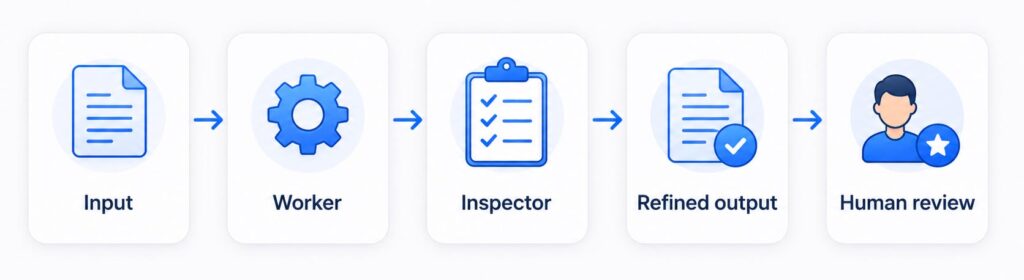
To improve reliability, I introduced a worker and an inspector. Worker builds the UI within the design constraints defined and then passes on to the Inspector for inspection. Only after inspector approves, the final output is shared with the user.
This changed the workflow from:
Generate and Manually fix
to:
Generate, Inspect, Refine
The most important shift was this:
The system did not try to make AI more creative. It made AI more constrained, more consistent, and more useful.
Testing the Workflow on Product Screens
To test the approach, I used actual product scenarios that typically require many small design decisions: headers, navigation, forms, tables, dialogs, and detail views.
These screens were useful test cases because inconsistency shows up quickly. If spacing, hierarchy, component usage, or interaction patterns drift, the screen immediately feels disconnected from the rest of the product.
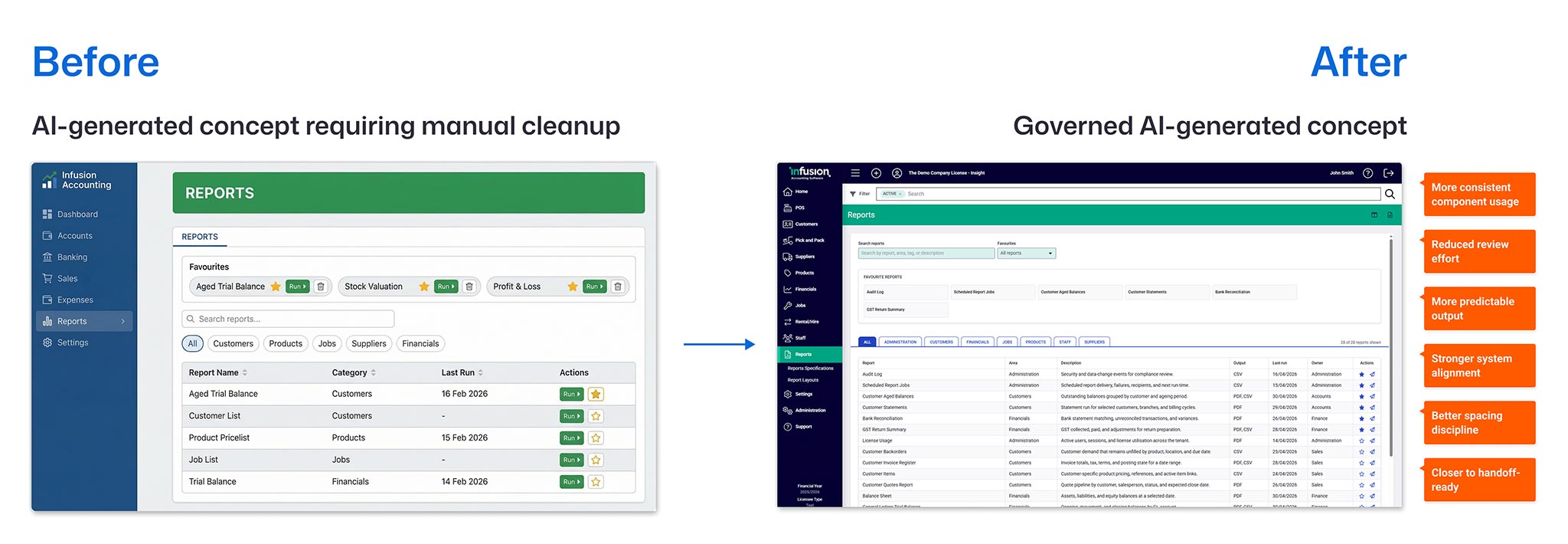
The governed workflow helped produce outputs that were closer to the intended system from the first pass. Instead of spending most of the time correcting basic inconsistencies, the review could focus on higher-value questions: user flow, information priority, task completion, and product fit.
The Outcome: Faster Generation, More Predictable Review
The biggest outcome was trust.
AI-generated UI became easier to review because it behaved more predictably. The outputs still needed human judgement, but they started from a stronger place.
The workflow helped with:
- Faster early screen exploration
- More consistent product patterns
- Less manual cleanup after generation
- Better alignment with design-system standards
- Clearer conversations between design, product, and engineering
- Reduced risk of one-off UI decisions entering the product
The biggest improvement was not just faster generation, but more predictable review. By separating creation from inspection, the workflow created a clearer quality loop before the output reached human review.
This was not about replacing designers. It was about helping teams move faster without losing the discipline that makes products coherent.
What I Learned
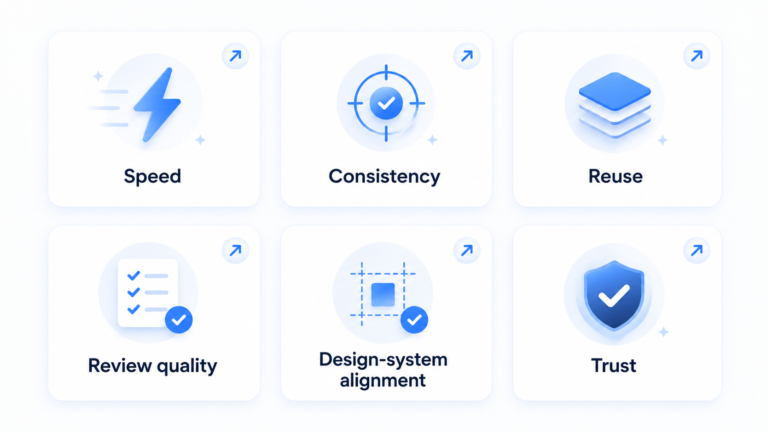
The biggest learning was that AI does not reduce the need for design systems. It increases it.
When AI enters the workflow, every undocumented decision becomes a place where the model can improvise. Every weak pattern becomes easier to multiply. Every missing rule becomes a source of inconsistency.
I also learned that reliable AI workflows work better when responsibilities are separated. Generation and inspection require different behaviours. Combining them into one step made the process less dependable.
But when the right structure exists, AI can become a powerful accelerator.
The value is not in asking AI to generate a screen. The value is in designing the environment that helps AI generate something useful, consistent, and reviewable.
For me, this project reframed design systems as more than documentation for humans. They can become operational infrastructure for AI-assisted product design.